

Entity lookup
Retrieve an entity and choose its fields and relationship cards.
New to entities, fields, and cards? Start with Understand the Crunchbase data model for a step-by-step organization-to-person example.
The Entity Lookup API endpoints are provided so you can retrieve data - data fields and relationships - from a specific entity. We provide Entity Lookup endpoints for many of our collections - e.g. organizations, people, funding rounds, and acquisitions. If any ranges or limitations exist, they will be noted within our reference documentation. For details on all of our collections, please visit our API Reference page
To make a request using our Entity Lookup APIs, you must provide the following:
- an API key in the
X-cb-user-keyheader - an
entity_id: the entity’s UUID or permalink, such ascrunchbase
You can also ask for additional data fields and relationships in the response by adding the "field_ids" and/or "card_ids" parameters to the request. Here is an example below:
In bash or zsh, set CRUNCHBASE_API_KEY to your provisioned key as shown in Make your first API request.
curl --include --request GET \
  'https://api.crunchbase.com/v4/data/entities/organizations/crunchbase?field_ids=identifier,short_description&card_ids=founders' \
  --header "X-cb-user-key: $CRUNCHBASE_API_KEY" \
  --header 'Accept: application/json'
Check: the status line is HTTP 200. Requested organization fields appear under properties; founder records appear in cards.founders. Each founder's identifier is at cards.founders[i].identifier.uuid. See the data-model walkthrough above for an annotated response.
How do I know what data are available to be returned in the response?
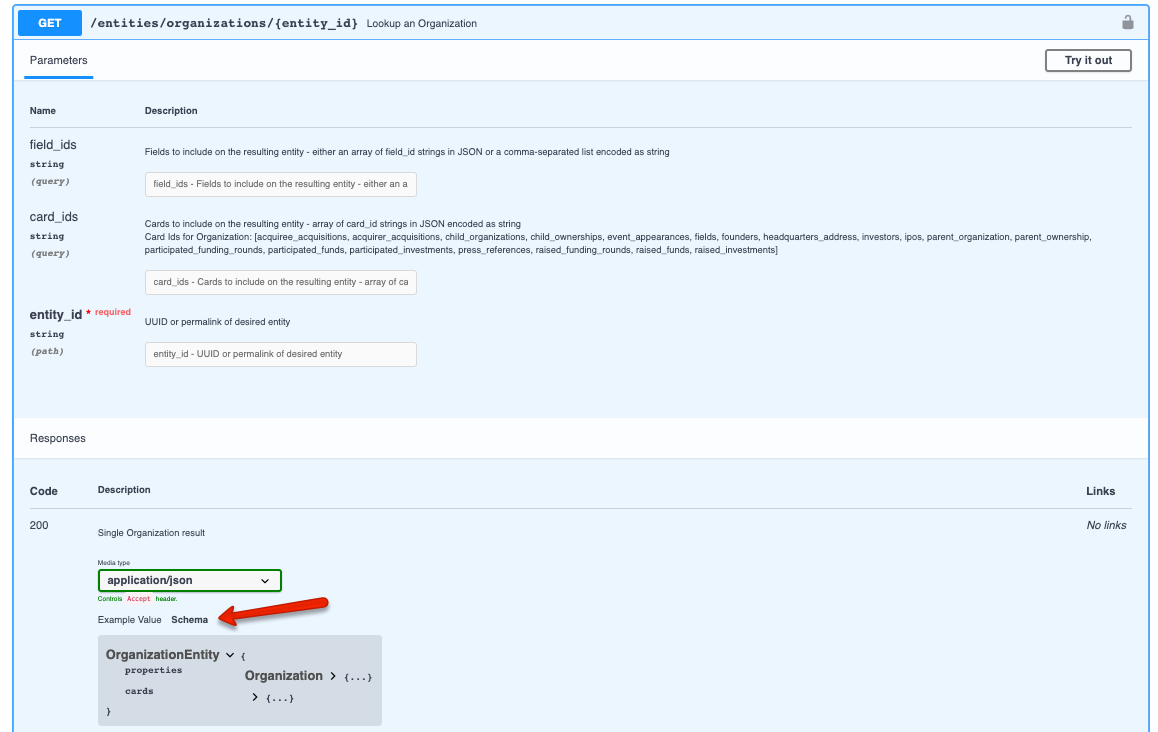
You can quickly see what data fields & relationships are available to be returned in the response for each collection by going to the specific endpoint's response schema.
- The field names listed under "Properties" are what you will put as the value for "field_ids"
- The card names listed under "Cards" are what you will put as the value for "card_ids"
Find the response schema:
-
- First go to the endpoint that you are interested in (let's say Entity Lookup for Organization)
-
- Scroll down to the Responses section
-
- Click on Schema (screenshot below)
Pro Tips: find permalink easilyWant to find the permalink for an entity?
- Go to www.crunchbase.com to find the entity you want, then take the last portion of the URL to get your permalink --> https://www.crunchbase.com/organization/{permalink}
- Use the autocomplete API - more details Autocomplete
Expect all data fields & relationships to be optionalUnless otherwise called out as a required field or relationship in the response schema, please configure your system/process to treat data fields & relationships (e.g. "card_ids") in the response as optional.
"Card" returns 100 items maxIf you choose to add a "card_id" to your request, please note that "card" will only return a max of 100 items.
To retrieve more results from a "card", you can paginate for more results by using the lookup API endpoint for a single card. More details in the single-card pagination guide
How do I get more results from a single "card_id"?
To retrieve more results from a "card", you can paginate for more results by using the lookup API endpoint for a single card. (ex: /entities/organizations/{entity_id}/cards/{card_id})
For step-by-step instruction, please refer to Paginate card results .
Updated about 10 hours ago